How the system comes together
cameras and door sensors (sense)
local/cloud storage policy (control)
event recording and alerts (actions)
viewer list with periodic review (operation).
What makes the delivery work
neighbour areas and private rooms masked; retention period agreed in writing; every permission change logged.
Who it’s for
- Security & Access Integrators
- US or Canadian project owners working with an appropriately qualified local installer
The project challenge
- A camera may capture neighboring property or an occupied private room.
What the system should achieve
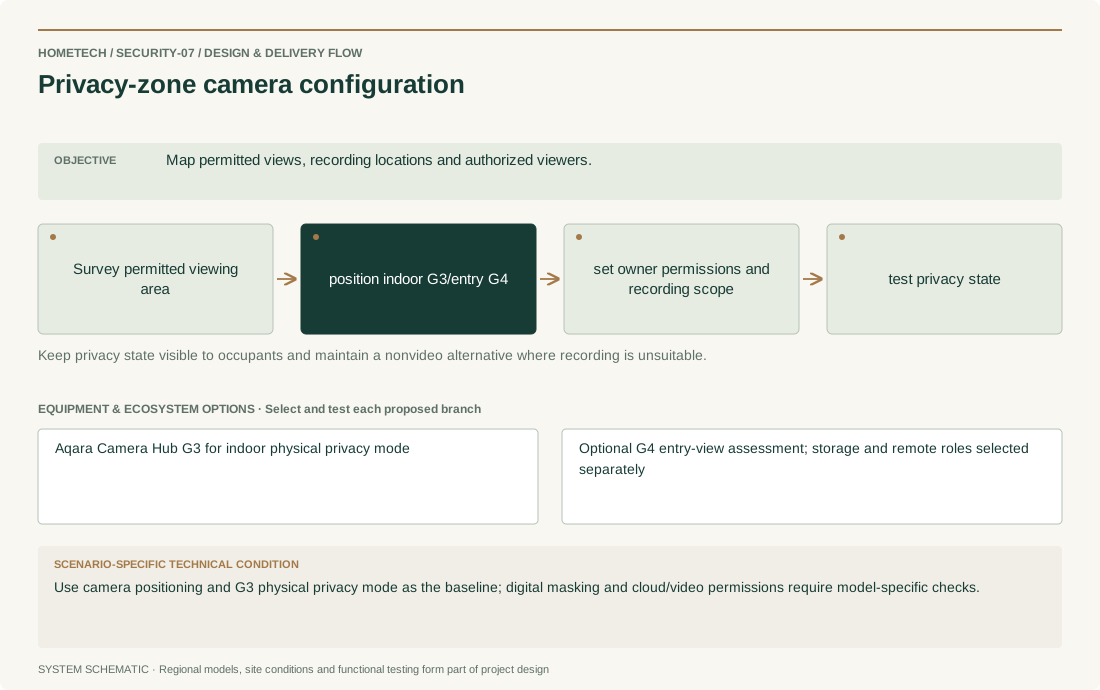
- Map permitted views, recording locations and authorized viewers.
Recommended system architecture
- Survey permitted viewing area → position indoor G3/entry G4 → set owner permissions and recording scope → test privacy state
- Keep privacy state visible to occupants and maintain a nonvideo alternative where recording is unsuitable.
Equipment & ecosystem choices
- Aqara Camera Hub G3 for indoor physical privacy mode
- Optional G4 entry-view assessment; storage and remote roles selected separately
Installation & technical requirements
- Record model, region, firmware, pairing owner and recovery steps; test each requested rule before replicating it.
- Site acceptance focus: Map permitted views, recording locations and authorized viewers.
Compatibility & construction constraints
- Matter, Zigbee and Thread have different roles. A shared protocol logo does not prove all features, controllers or commercial workflows are compatible.
- Use camera positioning and G3 physical privacy mode as the baseline; digital masking and cloud/video permissions require model-specific checks.
Make it your own
- For privacy-zone camera configuration, confirm room/door/zone counts, agreed controls, notification recipients and installation stage.
- Specific decision: Use camera positioning and G3 physical privacy mode as the baseline; digital masking and cloud/video permissions require model-specific checks.
Preliminary equipment plan
- One camera per consented view, not per room by default; one recorded access-role list and storage choice per account.
What shapes the budget
- Model combinations, rule count, network changes, licenses if applicable and maintenance ownership.
- Country/city, labor, taxes, shipping, warranty route and confirmed supply source; no price or stock is assumed.