Who it’s for
- Renovation & Retrofit
- US or Canadian project owners working with an appropriately qualified local installer
The project challenge
- Renovation crews can leave temporary accounts and unfinished automations behind.
What the system should achieve
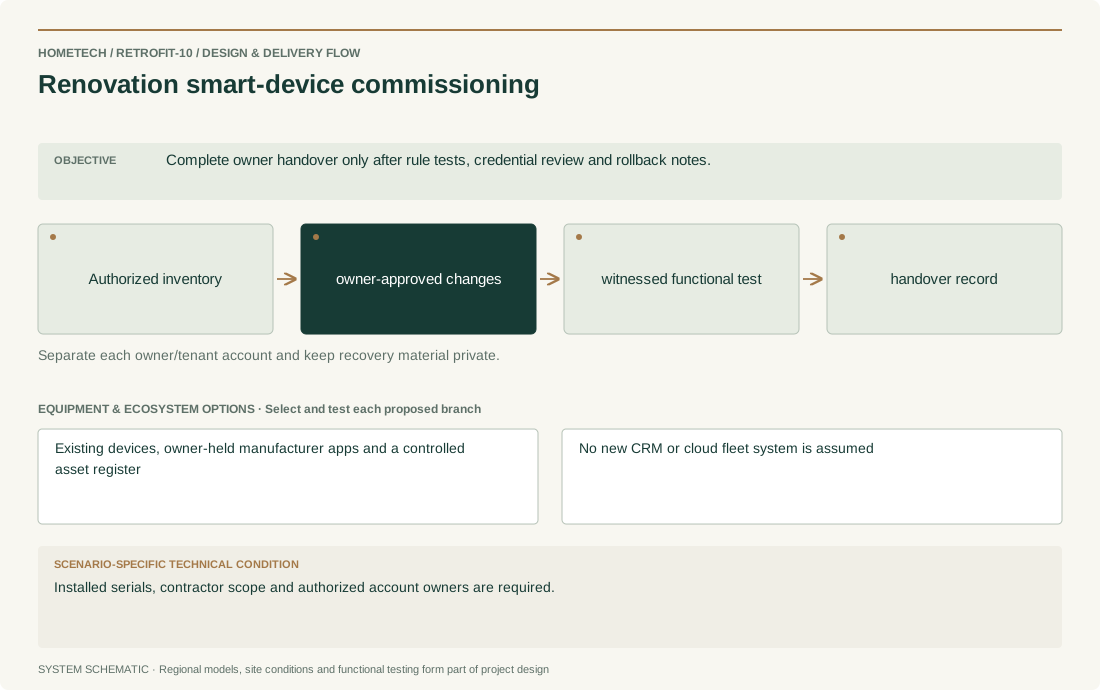
- Complete owner handover only after rule tests, credential review and rollback notes.
Recommended system architecture
- Authorized inventory → owner-approved changes → witnessed functional test → handover record
- Separate each owner/tenant account and keep recovery material private.
Equipment & ecosystem choices
- Existing devices, owner-held manufacturer apps and a controlled asset register
- No new CRM or cloud fleet system is assumed
Installation & technical requirements
- Get device-owner consent, identify who may reset equipment and record the recovery path before changing any pairing.
- Site acceptance focus: Complete owner handover only after rule tests, credential review and rollback notes.
Compatibility & construction constraints
- Bulk provisioning, fleet dashboards, access-log retention and API integrations are not established by consumer hub documentation.
- Installed serials, contractor scope and authorized account owners are required.
Make it your own
- For renovation smart-device commissioning, confirm room/door/zone counts, agreed controls, notification recipients and installation stage.
- Specific decision: Installed serials, contractor scope and authorized account owners are required.
Preliminary equipment plan
- Inventory lines equal installed serial-numbered devices; include one approved test record per unit, spare ratios only after failure-history review.
- Scale by the surveyed scope for renovation smart-device commissioning, not by a fixed package advertised without a site schedule.
What shapes the budget
- Device inventory quality, account ownership, travel, reset permissions and agreed support scope.
- Country/city, labor, taxes, shipping, warranty route and confirmed supply source; no price or stock is assumed.