How the system comes together
multi-protocol devices (sense)
hub and bridge plan (control)
cross-brand scenes (actions)
compatibility matrix and firmware archive (operation).
What makes the delivery work
interfaces and firmware verified before ordering; key scenes built only from verified combinations; the matrix is archived with the project file.
Who it’s for
- Smart Home Integrators
- US or Canadian project owners working with an appropriately qualified local installer
The project challenge
- Multi-protocol projects need explicit bridge boundaries to avoid unsupported pairing.
What the system should achieve
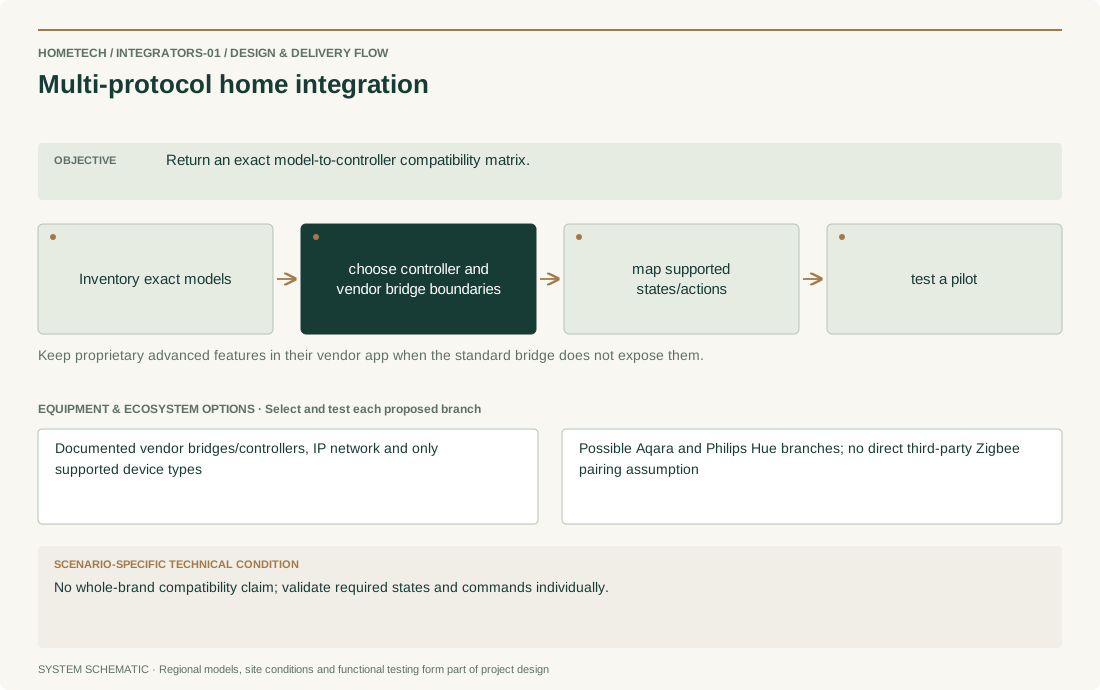
- Return an exact model-to-controller compatibility matrix.
Recommended system architecture
- Inventory exact models → choose controller and vendor bridge boundaries → map supported states/actions → test a pilot
- Keep proprietary advanced features in their vendor app when the standard bridge does not expose them.
Equipment & ecosystem choices
- Documented vendor bridges/controllers, IP network and only supported device types
- Possible Aqara and Philips Hue branches; no direct third-party Zigbee pairing assumption
Installation & technical requirements
- Record model, region, firmware, pairing owner and recovery steps; test each requested rule before replicating it.
- Site acceptance focus: Return an exact model-to-controller compatibility matrix.
Compatibility & construction constraints
- Matter, Zigbee and Thread have different roles. A shared protocol logo does not prove all features, controllers or commercial workflows are compatible.
- No whole-brand compatibility claim; validate required states and commands individually.
Make it your own
- For multi-protocol home integration, confirm room/door/zone counts, agreed controls, notification recipients and installation stage.
- Specific decision: No whole-brand compatibility claim; validate required states and commands individually.
Preliminary equipment plan
- Start with one representative unit of every model/firmware combination, its required controller/bridge and a pilot network; scale only after acceptance.
- Scale by the surveyed scope for multi-protocol home integration, not by a fixed package advertised without a site schedule.
What shapes the budget
- Model combinations, rule count, network changes, licenses if applicable and maintenance ownership.
- Country/city, labor, taxes, shipping, warranty route and confirmed supply source; no price or stock is assumed.